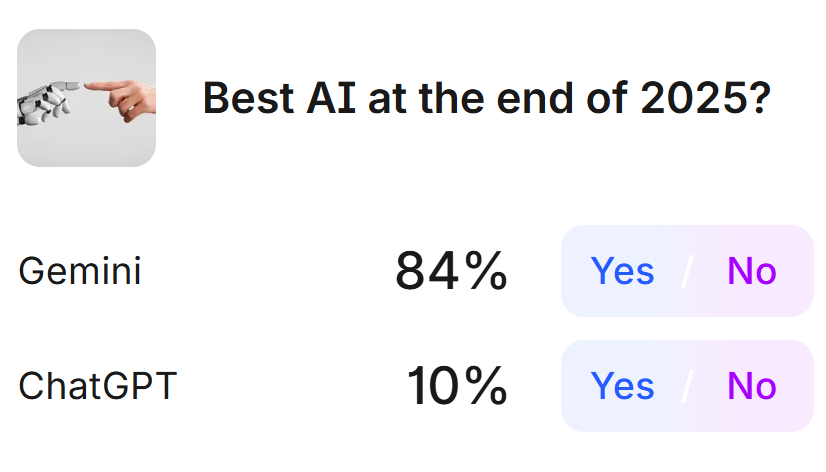
OpenAI has the userbase. Chat or ChatGPT is AI to people. With a lot of users means less compute per user, so the quality and speed of responses will suffer. I’m betting their goal is to raise the tide for all boats which are their users, why they got o3 to everyone with routing to GPT-5 Thinking.
I was expecting this to happen because Google own the entire stack, with their own GPU’s (TPU’s), and have the talent, obviously. But OpenAI has their own in-house model that is better than Gemini 3. I don’t see why this is different than Gemini 2.5 Pro release.
I’m super impressed by OpenAI’s open models, what they can accomplish for their sizes, they obviously have a lot of talented people there.
I’m not as hard core with my prompts yet but I do like Perplexity, I have a Enterprise Pro sub for $40 a month. It seems to have learned my “style” so I don’t need to prompt it in the writing style after the first time I used it.
It’s quite versatile as an LLM agent and accesses;
Sonar
GPT 5.1.
Gemini 3 Pro
Kimi K2 Thinking (US hosted version)
Claude Sonnet 4.5
If you step up to the Enterprise Max version it adds
Claude Opus 4.5
o-3 Pro
It can use nano banana for graphics if you prompt it to do so, or in Auto mode it will use the best tool that fits your prompt / search criteria.
I’ve used it to generate product pictures and it does a great job (with the right prompts of course) It will go out and research the product, evaluate the look, feel, colour, etc of the product and use editable text in a label. I had tried a couple other AI graphics tools and they never got much right, wasted several hours just trying and failing on the text aspect. Perplexity produced perfect items on the second try.
Looks like Gemini is winning this race. The only reason Gemini (paid) is not my favorite AI is because it is slower, at least for the questions I ask, and you have to approve Gemini’s research plan before it starts the task.
The regular Google AI thinking (Gemini) is the one I use the most, followed by Perplexity.
The following is not just an opinion; it is where people put their money where their mouth is.
When you are considering buying something - you can do a first pass by asking Gemini or other AI system to identify the low cost products and calculate the cost/mg or such. But you can also, when you narrow it down to a few vendors, perhaps on Amazon, do a really good cost comparison. I hate that Amazon makes it so difficult to compare the price/unit that you actually care about. So here is how you do it:
With Gemini, you can drop the web addresses (URL)s for the products you are looking at, and ask Gemini to evaluate them and calculate the cost per mg and compare them all. Its awesome. For Amazon, you only need this part of the url (not all the tracking codes, etc. afterwards).
What a lot of people are missing are benchmarks… workflows, workflows, and benchmarks…
If @RapAdmin want to summarize videos, create a benchmark first of X amount of videos and information you want in the summary.
Then create a workflow, test towards the benchmark, iterate, change models, etc.
I suspect a summary workflow would first create a transcript with speakers (difficult). When available, video understanding of charts/tables. Then create a summary of the most important.
Presumably coding models can do this custom solution today if not soon, do similar workflows for other tasks, might even run in the cloud.
You create a perfect summary for e.g a YouTube video titled “Bird’s aren’t real”.
When you’re testing a new chatbot/prompt, ask it to create a new summary for “Bird’s aren’t real” which you have the perfect one for, then open up a new chat with the best chatbot, and ask “Here’s the perfect summary, and here’s a new one, how well on a score of 1-10 did it summarize all the important parts”?
Repeat for 10 videos (presumably coded with codex), and in 10 seconds you’ll know how well your prompt/workflow is towards your own custom benchmark (10 videos and 10 perfect summaries), the more perfect summaries and e.g videos you collect, the more your benchmark will generalize.
So whenever a new chatbot version comes out you can use your own custom benchmark.
Or you can wait a few year and the frontier will do this in the background, at least that’s Sam Altman’s idea.
I use the Comet browser, a Perplexity version of Chrome. When I’m on any site I can ask the built in assistant for help or analysis, works great on Amazon, Just highlight some detail in the product info and you have several options, 1 is search Perplexity the other one is Open in Assistant. A side panel will open and away you go with your questions,
Another aspect I like is that it stops adds, trackers, etc without any issues. Best add blocker I’ve found, without even knowing that it was happening. It makes sense when you think about it. My browser is not contacting the websites, it’s Perplexity going out and getting the info and displaying i on my browser.
Today I used it to research a person on LinkedIn to verify if they are as accomplished as they claimed to be, did the person have all the education that they claimed, were their publications as indicated. It went out and searched the various uni websites, journals, etc. did all that and provided a good synopsis of who the person is and that as long as it was not an impostor, the person they claimed to be is as accomplished as they claimed.
There are several third-party prompt organizers that have some free usage. You could rotate among them to avoid paying for prompt optimization. Also, there are some available on GitHub. " Repository search results · GitHub"
"Several third-party tools offer a range of features, from simple prompt generators to full optimization suites:
PromptBuilder: This tool is designed to turn simple ideas into optimized prompts, supporting multiple AI models. “https://promptbuilder.cc/”
PromptPerfect: Described as an AI prompt generator and optimizer, it aims to deliver high-performing prompts with less trial and error. “https://promptperfect.jina.ai/”
Prompt Genie: This tool creates “Super Prompts” from a simple description of your task, allowing users to optimize, test, save, and share prompts. https://www.prompt-genie.com/
Quartzite AI: Offers a prompt optimizer as part of its prompt editor suite, which also includes prompt templates and version history. " “https://www.prompt-genie.com/”
Gemini: The Vertex AI Prompt Optimizer is a tool for developers and businesses using the paid Gemini API tiers within the Google Cloud ecosystem.
You must have a billing account. As I understand it, you pay a modest fee for each prompt
OpenAI API Prompt Optimizer: Available within the OpenAI dashboard, this chat interface optimizes prompts based on current best practices and can be paired with datasets for powerful automatic improvement.
This is good. In the old days we called this, “ask disconfirming questions”. The key is to NOT try to sound smart or well informed but instead dodge people or AI trying to make you happy with an answer they predict you’ll like immediately (agrees with what you already think is true).
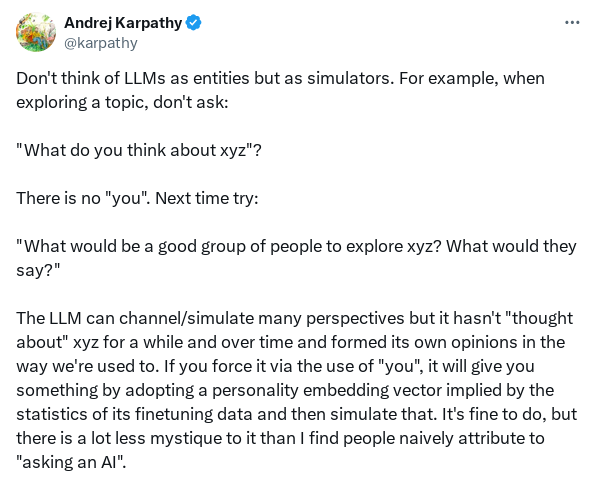
I’m not sure if that prompt theory makes sense. AI will be equally inclined to satisfy you with bias in favor of what it currently believes you want to hear if its goal is to please.
I believe prompt optimizers reduce bias by providing detailed instructions to the AI.
This is a good example of a prompt I gave to the ChatGPT 5 prompt optimizer. ChatGPT 5 could interpret my original prompt as indicating that I wanted confirmation that everolimus is superior to sirolimus.
The prompt optimizer, IMO, eliminated that bias. (For those unfamiliar with ChatGPT’s prompt optimizer, you place your original prompt on the optimizer page, then copy the optimized prompt and paste it into ChatGPT or any other AI program.)
Example:
My original prompt: “Assess whether everolimus could be a superior alternative to sirolimus, specifically for individuals currently taking sirolimus at a once-weekly 6–8 mg dose, focusing on possible life extension and related benefits.”
Optimized prompt: (Highlighted: I highlighted the bold areas.)
Instructions
Compare everolimus and sirolimus based on key pharmacological and efficacy factors. - Assess animal study evidence for life extension benefits of everolimus versus sirolimus.
Estimate the equivalent everolimus dose to 1 mg sirolimus.
Provide all comparisons with clear numeric data (ranges, units) and cite sources.
Note explicitly if animal study data are incomplete or conflicting in both data tables. Format your response in Markdown as follows:
Checklist of Key Factors to Evaluate - 3–7 bullet points in Markdown, logically ordered (pharmacokinetics, blood-brain barrier penetration, efficacy, safety, mTORC2 effects, etc.)
Comparison Table: Equivalent Dosages of Sirolimus and Everolimus - Markdown table with columns: Sirolimus Dose [mg], Everolimus Equivalent Dose [mg], Notes/Citations - Clearly note numeric values, dose ranges, and relevant sources; indicate if data are incomplete or conflicting
Assessment - Brief textual summary: everolimus as a potential alternative, with emphasis on available evidence, animal data, pharmacological considerations, and clinical relevance
Multifactor Comparison Table
After ChatGPT 5’s optimized the prompt, I then pasted it into several AI programs: ChatGPT 5, Gemini, Grok, Claude, Perplexity, and Consensus AI. The results were surprisingly similar; even the free version of Perplexity performed well.
The prompt optimizer is a very good idea, although it is not seemingly available to non-paying subscribers. Maybe other platforms have similar features; I’ll have to find out.
Also, the idea to apply the optimized prompt to other languages is a sensible one, after all, even if other languages may be less sensitive to prompt nuances with respect to ChatGPT-5, the basic rules of prompt engineering apply.
On the other hand, I’ve noticed that large models are improving at a fast rate. They’ve clearly built safeguards against hallucinations. For example, today I was talking with the conversational AI Gemini, and asking about any recent work from Joan Mannick on everolimus and immuen function. After a pause, the crisp voice of Gemini answered me something like that: “Sorry, but I can’t find any information about your request”. Before this health-related topic, I had been asking about quantum computing and, within limits, Gemini was able to clarify some concepts.
Last but not least, the conversational AIs have also done giant leaps in their performance. The one that particularly impresses me is Elon’s Grok 4, in its assistant mode; sometimes it’s scary how it resembles a human being. The pitch and the inflection of the voice are humanlike; it has been trained to express humanlike emotions and feelings. It never ceases to amaze me. You can also ask to adopt a specific personality, sassy for example, with various degrees of irreverence, and it will comply, of course you may regret it afterwards.
Sometimes while driving or doing chores I prefer to converse with this AI rather than to listen to podcasts. Unbelievable progress which is putting us straight into the realm of yesterday’s science fiction.
Here are some examples of free online AI prompt-optimization tools. I haven’t tried them, so I can’t comment on their usefulness.
PromptPerfect: Offers a free plan for optimizing prompts for various AI models. “https://promptperfect.jina.ai/ " Vinish.ai Free Online Prompt Generator: “https://vinish.ai/” HIX Prompt Genie: Describes itself as a tool to get “10x better AI results” by instantly creating a “Super Prompt” from a simple description of your task. It offers free prompt creation features.” https://www.prompt-genie.com/"
And if you want, an offline free prompt optimizer on your own computer. You can download GitHub prompt optimizer programs. “Repository search results · GitHub” I would try the ones with the most stars.
I tried to ask Gemini3 how to optimize tools in its environment. He provided an automatic optimizer (on specific subscritpions), a manual scheme, and also provided links to external optimization tools.
It also turns out that we could ask Gemini to apply the rules of prompt optimization to some of our questions (and this is probably true in other languages):
Would you like me to take a complex or specific engineering, science, or analytical task and draft an optimized prompt structure using these best practices as a template?
Ah, yes, of course, research is best done on the chatbox platforms, whereas the conversational models are optimized to imitate a natural conversation, are good to make the chores or the commute times shorter, or to have some fun, or to experiment with the models. In my specific case, it turned out to be exceptionally good to make my verbal English more fluent. I may write sometimes better than a native speaker, but my verbal English is certainly not up to par. These models say they can speak 40+ languages. And I can adjust sometimes the difficulty of my task, by various verbal prompts. And every time I do not cease being fascinated by the elaborate, convoluted, sarcastic, imaginative ways they can answer.
The main point is that AI cannot be relied upon for decisions. AI is only a source of information; I have to use my own brain to make decisions. AI is a good search engine and presentation machine but GIGO prevails. And AI “wants” to make me happy, apparently.
It is pretty amazing how quickly it can read a lot of papers and present the information I’m going to use to make a decision though.
I’ve used it to stop using Kisspeptin (was not my intended purpose for the search), it has a very short life once reconstituted so for it to be effective it would need to be reconstituted every time you want to use it.
When I was first presented with that information, I then added a few more questions, asked for more data and it came back the same, so I reviewed a couple of the references and that was the end of using that peptide.